
VKS, Spherelet and Harbor: Finally Getting My Supervisor to 9.1.1
In Part 1, an ill-judged Upgrade All left my VCF management components in a deadlock. In Part 2, an intermediate Supervisor update exposed a separate problem in the VCF Automation service bundle path. Configuration Service and Metrics Aggregator Service were healthy again, but the upgrade I had originally set out to do was still waiting.
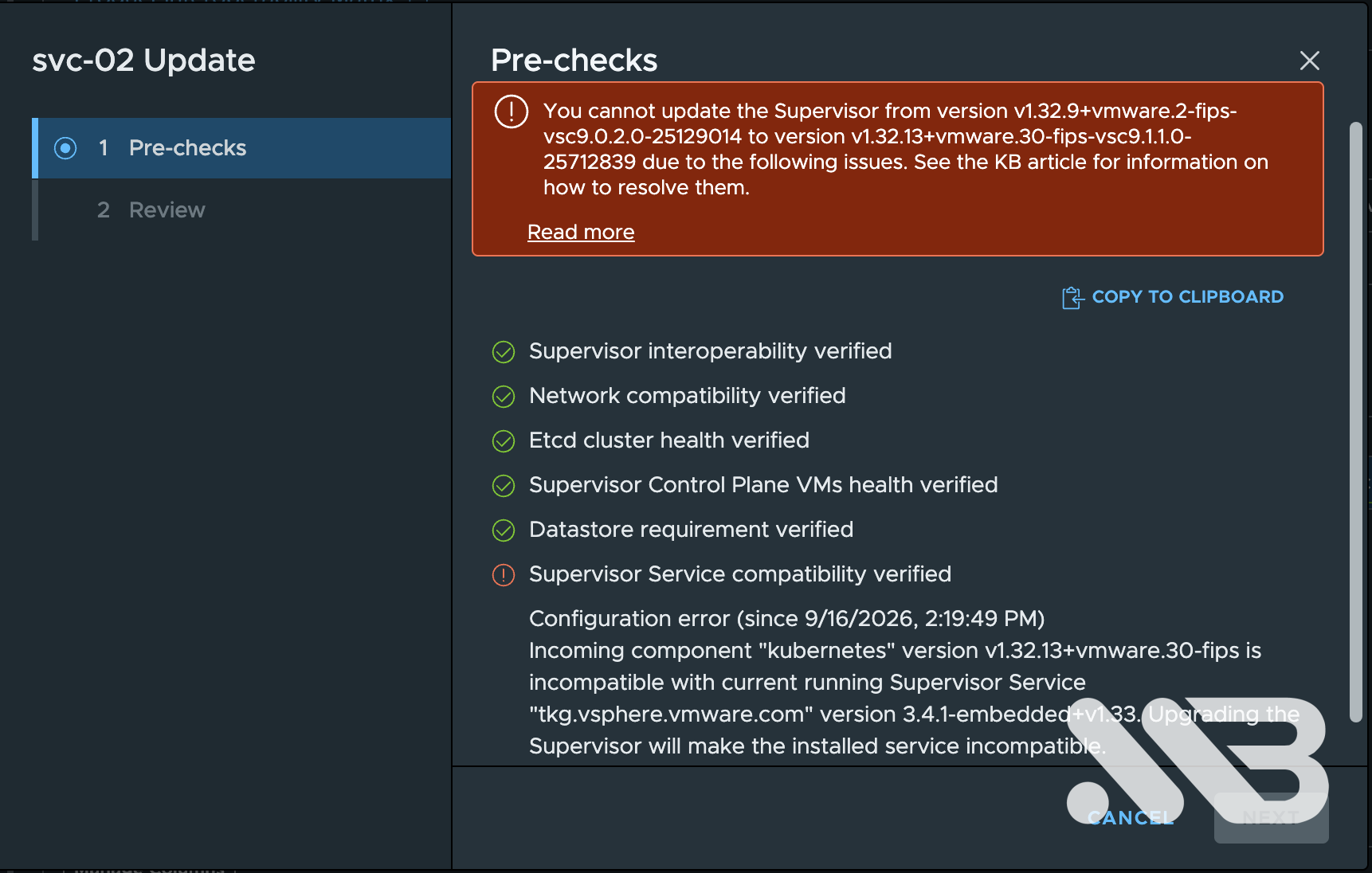
The Supervisor was on v1.32.9+vmware.2-fips-vsc9.0.2.0100-25262241. I wanted v1.32.13+vmware.30-fips-vsc9.1.1.0-25712839. VKS 3.4.1 was in the way. Getting past it required a manually registered VKS release. Then the Supervisor upgrade stopped halfway through because Spherelet could not be replaced on the ESXi hosts. Once the Supervisor finally reached 9.1.1, Harbor ran into a Storage Quota certificate problem.
That is the order things happened in my lab. The three issues needed three different answers.
TL;DR
| Point | What I learned |
|---|---|
| Check the installed service, not just the package list | kubectl get pkgi showed VKS 3.4.1 even though newer VKS packages were visible. |
| Registering VKS is not upgrading it | I added the Legacy 3.6.2 YAML to vCenter, then separately upgraded the existing Kubernetes Service. |
| A failed reconcile was temporary here | The ClusterClass resource conflict cleared on the next attempt; VKS and its child packages reached Reconcile succeeded. |
| The control plane and hosts were at different stages | Kubernetes nodes were already on 1.32.13 while the Supervisor workflow remained in ERROR at 50% during the host step. |
| Compare the whole Spherelet build | The prefix remained 9.0.1.32.5.0; the build changed from 25065159 to 25606416. |
| A valid Secret did not mean a valid live TLS session | Both Storage Quota Secrets showed new certificates, but Harbor’s next PVC request still encountered an expired certificate. |
| The final Harbor fix was specific | Regenerating two child certificate Secrets, then restarting their components, let Harbor create PVCs and reconcile. I left the root CA alone. |
VKS 3.4.1 was still installed
The Supervisor’s package list contained several VKS releases. The question was which version its Kubernetes Service actually used:
kubectl get pkgi svc-tkg.vsphere.vmware.com \
  -n vmware-system-supervisor-services
NAME                         PACKAGE NAME            PACKAGE VERSION        DESCRIPTION
svc-tkg.vsphere.vmware.com   tkg.vsphere.vmware.com  3.4.1-embedded+v1.33  Reconcile succeeded
The PackageInstall was also pinned to 3.4.1-embedded+v1.33 in spec.packageRef.versionSelection.constraints. kubectl get packages had shown which releases were available; pkgi told me which release was installed and whether its reconcile had succeeded. The Supervisor’s Kubernetes version was 1.32.9. The +v1.33 suffix is part of the VKS package version, not the current Supervisor Kubernetes version.
Broadcom KB 444485 describes a Supervisor upgrade blocked by VKS 3.4.1 and recommends VKS 3.6.2 before the Supervisor update. Its example uses different Supervisor builds from mine, so check the compatibility of your own source and target versions; the KB was my clue for the sequence. I had registered 3.6.1 during troubleshooting but never activated it. I went for 3.6.2 instead.
The missing release in the UI
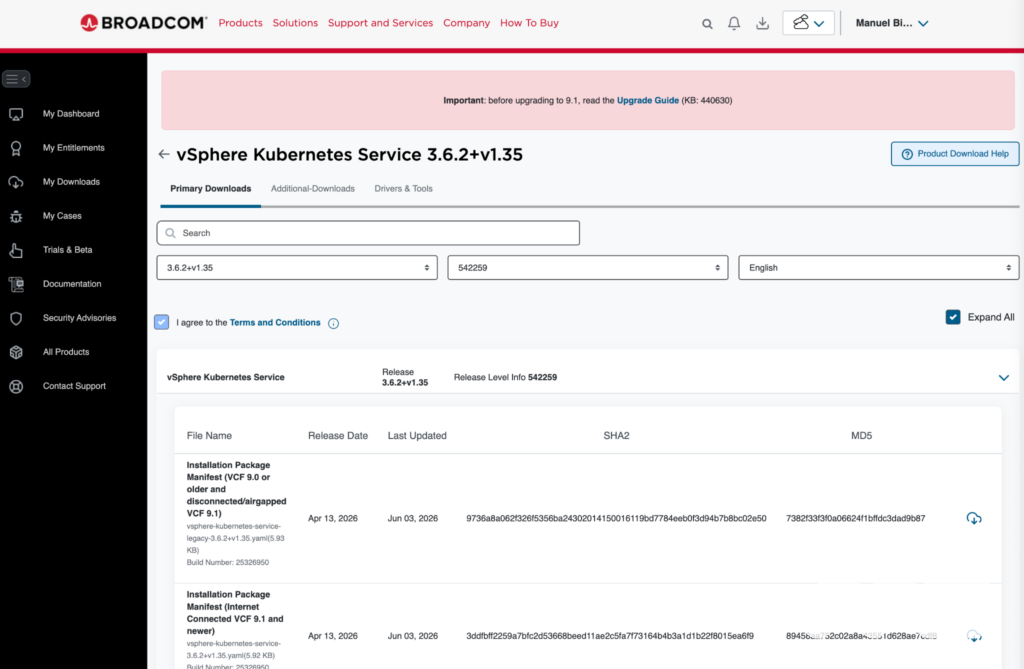
VKS 3.6.2 was not offered as an upgrade choice. Broadcom’s explanation is that asynchronous VKS releases may need to be downloaded and registered manually.
Because I was still registering the service on a 9.0.x Supervisor, I selected the Legacy file:
vsphere-kubernetes-service-legacy-3.6.2+v1.35.yaml
The Standard YAML uses depot.kube-system.svc; the Legacy YAML points to projects.packages.broadcom.com. KB 442742 explains why the variant matters for pre-9.1 and air-gapped environments.
The Broadcom download portal initially answered the 3.6.2 request with Something went wrong, try again later. Version 3.6.1 downloaded, but that did not change the version I needed. I returned to the 3.6.2 release page, retried and got the Legacy YAML. I never established the cause of the portal error.
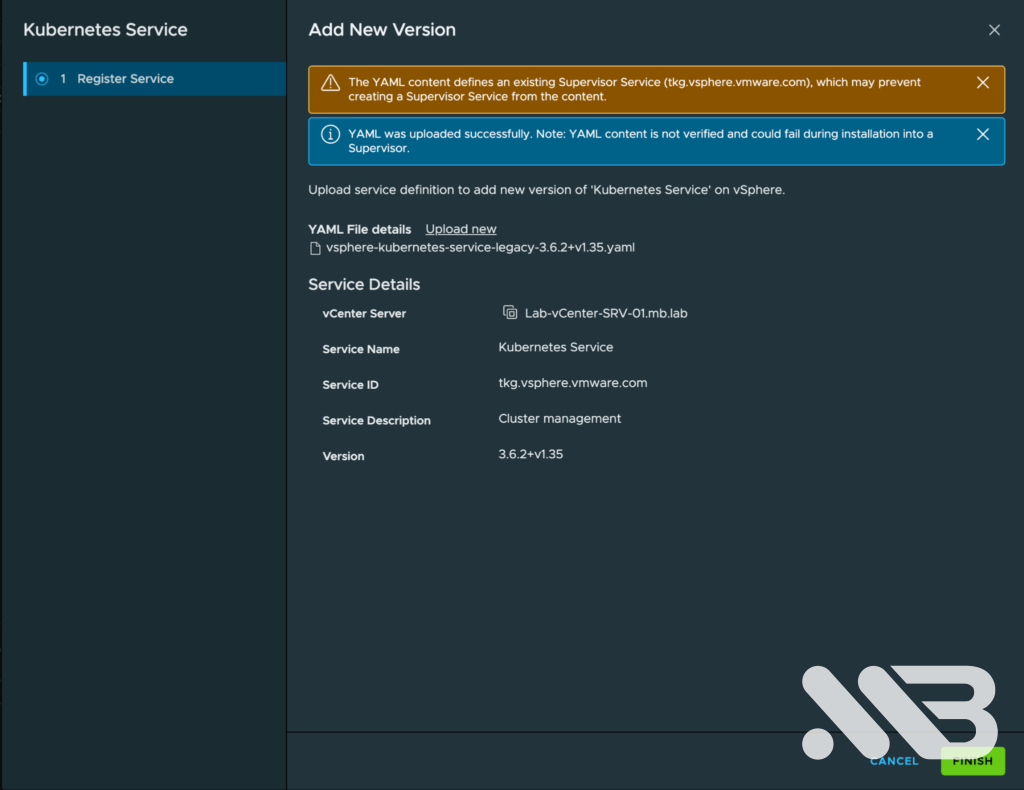
In the vSphere Client I opened Supervisor Management → Services → Kubernetes Service → Actions → Add New Version and uploaded the file. The warning that the service already existed was expected; I was adding a version of tkg.vsphere.vmware.com.
I checked the registration from the Supervisor:
kubectl get packages -n vmware-system-supervisor-services \
  | grep 'tkg.vsphere.vmware.com.3.6.2'
tkg.vsphere.vmware.com.3.6.2+v1.35 tkg.vsphere.vmware.com 3.6.2+v1.35
At this stage the PackageInstall still said 3.4.1. This was the expected intermediate state: 3.6.2 was available but not active. I then selected Actions → Upgrade on the Kubernetes Service tile and chose 3.6.2+v1.35.
One failed reconcile
I followed the change with:
watch -n 10 'kubectl get pkgi svc-tkg.vsphere.vmware.com -n vmware-system-supervisor-services'
It moved to 3.6.2 and Reconciling, then one attempt failed. The full error was more useful than the red status:
kubectl get pkgi svc-tkg.vsphere.vmware.com \
  -n vmware-system-supervisor-services \
  -o jsonpath='{.status.usefulErrorMessage}{"\n"}'
Failed to update due to resource conflict
...
Operation cannot be fulfilled on clusterclasses.cluster.x-k8s.io
"builtin-generic-v3.2.0": the object has been modified;
please apply your changes to the latest version and try again
kapp and another manager had tried to update the same ClusterClass close together. I did not delete a PackageInstall, edit the ClusterClass or roll VKS back. The next reconcile succeeded. I then checked the child PackageInstall resources in svc-tkg-domain-c79608; all relevant components reported Reconcile succeeded. That namespace contains my Supervisor domain ID and will differ elsewhere.
This one conflict resolved on its own. I would investigate a failure that persists or returns with a different error instead of assuming every red reconcile is harmless.
The Supervisor stopped during the host phase
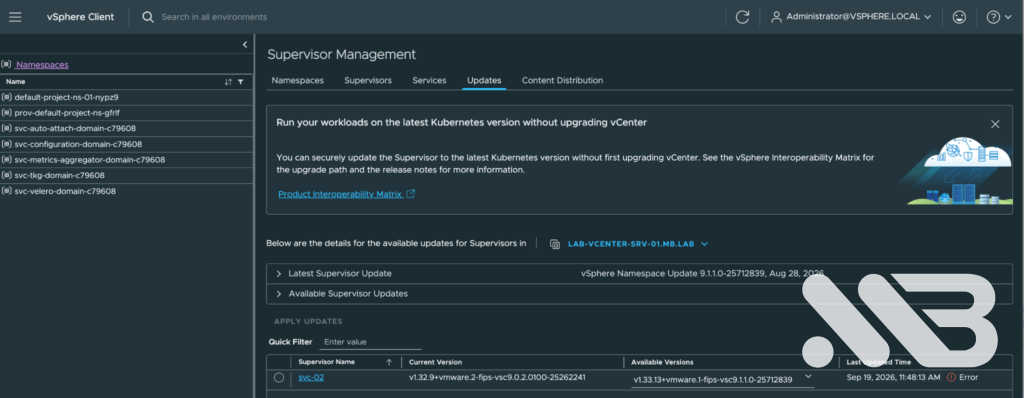
Now I could start the planned upgrade to v1.32.13+vmware.30-fips-vsc9.1.1.0-25712839. The control plane made progress, but the first host, lab-esx04.mb.lab, repeatedly failed Apply Solution. The vSphere Client said:
Solution(s) apply failed on host: 'lab-esx04.mb.lab'

The WCP log in vCenter showed the failed ApplyUpgradeTask. On the host, hostd.log explained why the solution could not be applied:
Failed to unmount tardisk spherele.v00
rm: can't remove '/tardisks/spherele.v00': Device or resource busy
Could not install image profile
The installed Spherelet component was VMware_bootbank_spherelet_9.0.1.32.5.0-25065159. Broadcom KB 443649 describes this locked tardisk during the VCF 9.0 to 9.1 Supervisor transition. I stopped Spherelet on the affected host:
/etc/init.d/spherelet stop
Then I let vLCM retry. lab-esx04 moved to build 9.0.1.32.5.0-25606416. The prefix still began with 9.0.1, which initially made the result look unchanged. The build number, from 25065159 to 25606416, was the useful comparison.
A workflow at 50%, a control plane already on target
Fixing the first host did not make the original workflow recover. It ended in ERROR at the host upgrade step. On vCenter I checked its state:
dcli com vmware vcenter namespacemanagement software clusters get \
  --cluster domain-c79608
desired_version: v1.32.13+vmware.30-fips-vsc9.1.1.0-25712839
progress:
  completed: 50
  message: Namespaces cluster upgrade is in the "upgrade host" step.
state: ERROR
Rather than guessing the target Spherelet build for the remaining hosts, I asked vLCM for the cluster’s desired WCP solution:
dcli com vmware esx settings clusters software solutions list \
  --cluster domain-c79608
com.vmware.vsphere-wcp:
  version: 9.0.1.32.5.0-25606416
My cluster has three hosts. I remediated them one at a time rather than starting Remediate All while vCenter was moving VMs. On esx05, the first attempt failed to remove VMware-Spherelet-1-32(9.0.1.32.5.0-25065159) because files were in use; hostd.log showed spherele.v00: Device or resource busy again. I stopped Spherelet, retried remediation, waited for it to finish, exited Maintenance Mode and checked the WCP component. I repeated the process on esx06.
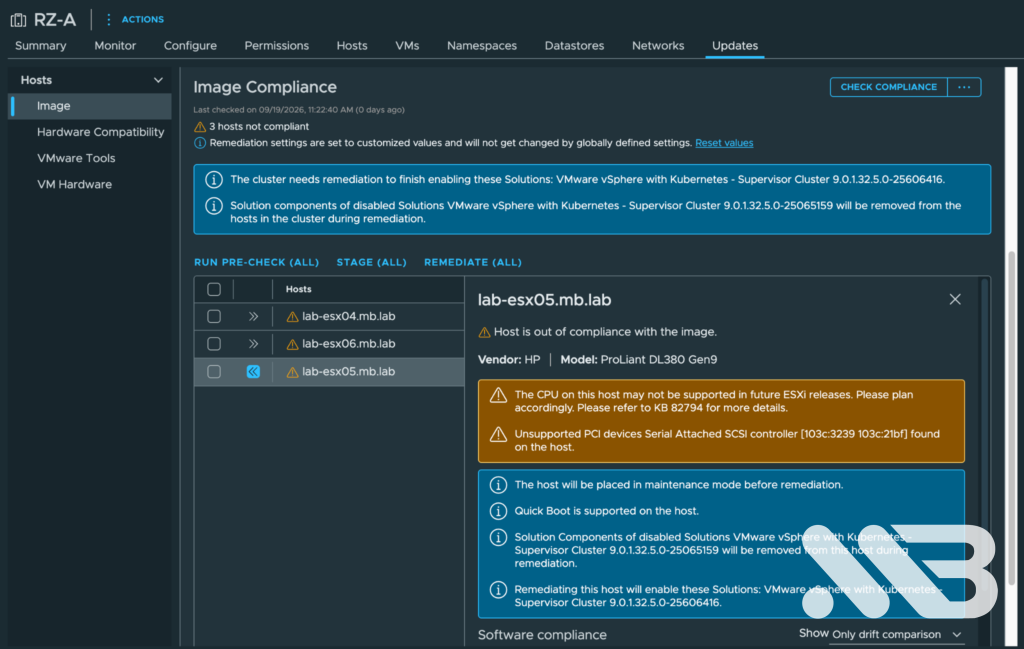
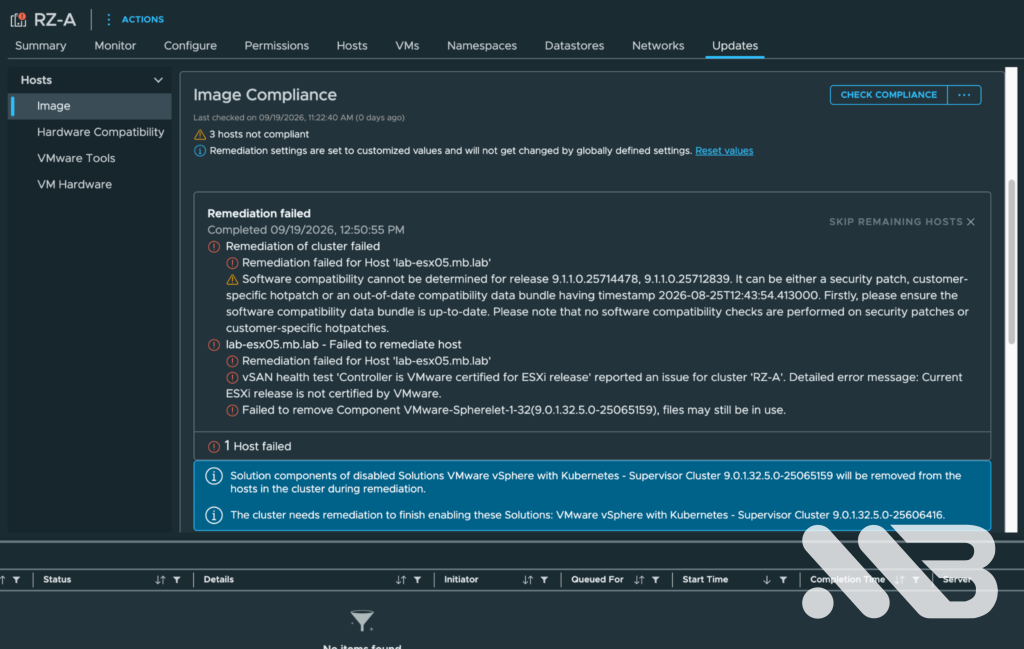
All three hosts eventually had build 25606416, and vLCM reported All hosts in this cluster are compliant. KB 428072 is another useful reference for a Supervisor upgrade stuck at 50% in the host phase.
While the overall workflow was still failed, kubectl get nodes already showed the three Supervisor control plane nodes Ready on v1.32.13+vmware.30-fips; the ESXi agent nodes were Ready too. A check of Pods across namespaces showed nothing suspicious. That is why I looked at vCenter workflow state, vLCM compliance and Kubernetes node state separately: they were at different points in the same upgrade.
With the hosts compliant, I retried the same 1.32.13 target. The UI already offered 1.33.13, but I wanted the planned version to finish cleanly first. This time wcpsvc.log reported ApplyUpgradeTask SUCCEEDED, and dcli finally showed:
desired_version: v1.32.13+vmware.30-fips-vsc9.1.1.0-25712839
current_version: v1.32.13+vmware.30-fips-vsc9.1.1.0-25712839
state: READY
The Supervisor prechecks were TRUE. I thought I was finished. Then I looked at Harbor.
Harbor could not create its first PVC
VCF Automation still showed Harbor as Unhealthy. The installed service package was harbor.tanzu.vmware.com 2.15.2+vmware.1-vks.1.
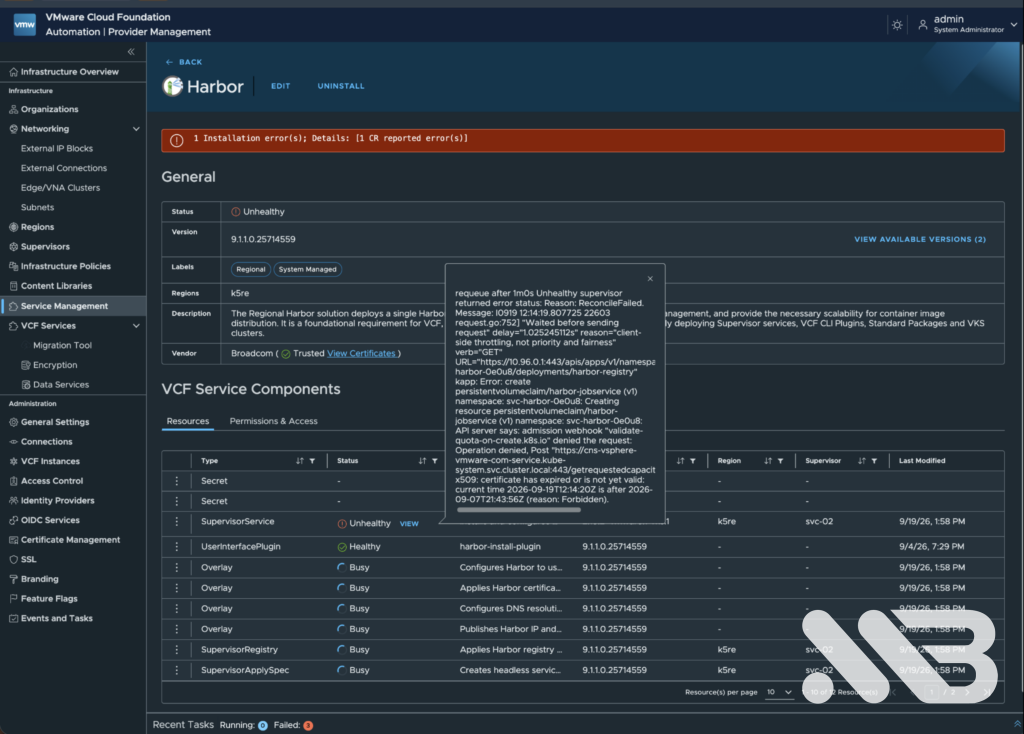
The corresponding Carvel App had the more useful explanation:
kubectl get app svc-harbor.tanzu.vmware.com \
  -n vmware-system-supervisor-services \
  -o jsonpath='{.status.deploy.updatedAt}{"\n"}{.status.usefulErrorMessage}{"\n"}'
kapp: Error: create persistentvolumeclaim/harbor-jobservice ...
admission webhook "validate-quota-on-create.k8s.io" denied the request
...
x509: certificate has expired or is not yet valid
current time 2026-09-19T12:24:23Z is after 2026-09-07T21:43:56Z
Harbor had not even got as far as starting its workload. Creating harbor-jobservice was denied because the Storage Quota webhook could not establish a valid TLS connection to the CNS quota service. kubectl get pvc,pods -n svc-harbor-0e0u8 returned no resources. Broadcom KB 425861 describes this class of failure in VCF Automation deployments.
The Secrets looked fine
I decoded the certificate material from storage-quota-webhook-server-internal-cert and cns-storage-quota-extension-cert. Both Secrets contained certificates valid until November 2026, and the Storage Quota root CA was valid too. Yet a fresh Harbor reconcile still complained about a certificate that had expired on September 7.
My working conclusion was that renewed material in the Secrets had not made it into the live communication path. I first tried the less invasive restart:
kubectl rollout restart deploy -n kube-system storage-quota-webhook
kubectl rollout restart deploy -n kube-system cns-storage-quota-extension
Both deployments restarted. I watched .status.deploy.updatedAt on the Harbor App, so I could distinguish an old error from a new attempt after the restart. The next attempt failed with the same expired certificate. An Edit/Save in VCF Automation did not create a new generation because I had not changed any settings; the App was already retrying every ten minutes anyway.
KB 424055 documents a stronger restart procedure. I scaled each deployment to zero and back to its original replica count, then waited for the rollout:
kubectl -n kube-system scale deploy storage-quota-webhook --replicas=0
kubectl -n kube-system scale deploy storage-quota-webhook --replicas=3
kubectl -n kube-system rollout status deploy/storage-quota-webhook

kubectl -n kube-system scale deploy cns-storage-quota-extension --replicas=0
kubectl -n kube-system scale deploy cns-storage-quota-extension --replicas=1
kubectl -n kube-system rollout status deploy/cns-storage-quota-extension
The components came back, but the next Harbor reconcile still saw the old certificate. Another restart with unchanged certificate material was unlikely to give me a different result.
Regenerating the two child certificates
KB 422493 describes a mismatch after CA renewal where child certificates are not refreshed automatically. I backed up the two child Secrets before changing them:
kubectl get secret -n kube-system \
  storage-quota-webhook-server-internal-cert \
  cns-storage-quota-extension-cert \
  -o yaml > /root/storage-quota-certs-before-regen.yaml
I deleted only those two child Secrets, leaving the Storage Quota root CA Secret in place:
kubectl delete secret -n kube-system storage-quota-webhook-server-internal-cert
kubectl delete secret -n kube-system cns-storage-quota-extension-cert
After cert-manager recreated the Secrets and the Certificate resources returned to Ready=True, I checked the new serials, issuers and dates. For each Secret:
kubectl get secret -n kube-system storage-quota-webhook-server-internal-cert \
  -o jsonpath='{.data.tls\.crt}' | base64 -d \
  | openssl x509 -noout -serial -subject -issuer -dates

kubectl get secret -n kube-system cns-storage-quota-extension-cert \
  -o jsonpath='{.data.tls\.crt}' | base64 -d \
  | openssl x509 -noout -serial -subject -issuer -dates
Then I scaled both deployments down and up again so the processes loaded the regenerated certificates:
kubectl -n kube-system scale deploy storage-quota-webhook --replicas=0
kubectl -n kube-system scale deploy cns-storage-quota-extension --replicas=0
kubectl -n kube-system scale deploy storage-quota-webhook --replicas=3
kubectl -n kube-system scale deploy cns-storage-quota-extension --replicas=1
kubectl -n kube-system rollout status deploy/storage-quota-webhook
kubectl -n kube-system rollout status deploy/cns-storage-quota-extension
On the next Harbor reconcile, something finally changed: harbor-jobservice and harbor-registry PVCs appeared as Bound at 10 GiB and 500 GiB. They had not existed before. A few minutes later the Harbor core, database, job service, nginx, portal, Redis, registry and Trivy Pods were all Running. The service PackageInstall ended at:
svc-harbor.tanzu.vmware.com harbor.tanzu.vmware.com 2.15.2+vmware.1-vks.1 Reconcile succeeded
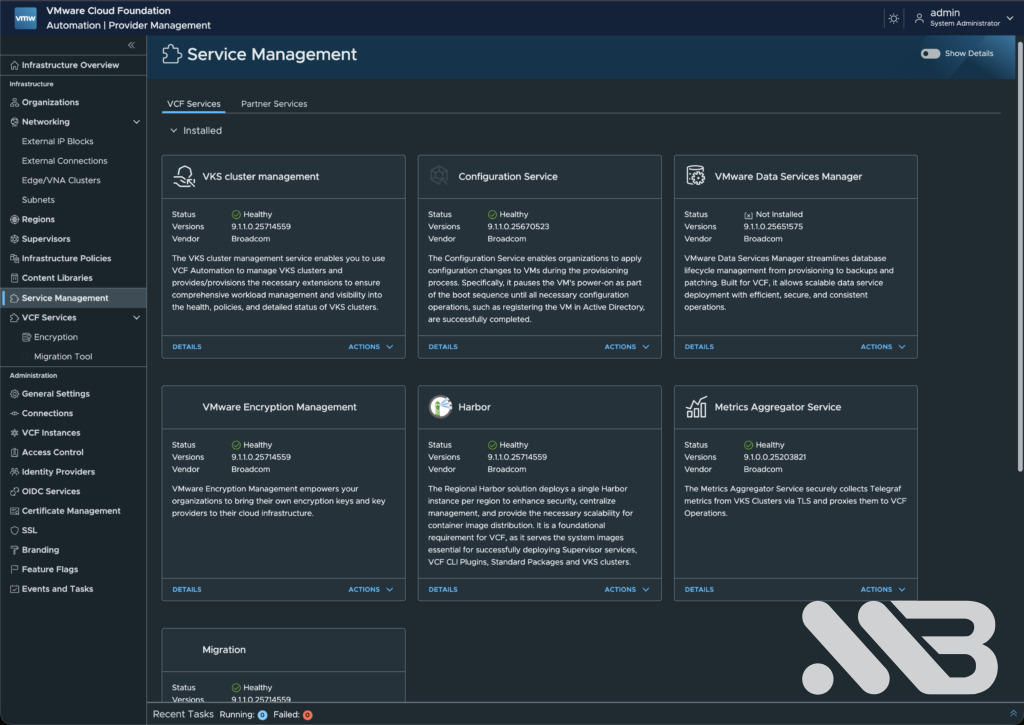
The combination of child certificate regeneration and a full component restart resolved the problem in this lab. Since those actions were done together, I cannot isolate which part of the certificate state produced the expired TLS response, beyond the observation that restarts alone had failed.
Where the upgrade finished
| Stage | Result |
|---|---|
| VKS | 3.4.1-embedded+v1.33 → 3.6.2+v1.35; top-level and child packages reconciled. |
| Supervisor control plane | Kubernetes 1.32.13 reached while the overall workflow was still waiting on hosts. |
| Spherelet on three ESXi hosts | Build 25065159 → 25606416; all hosts compliant after individual remediation. |
| Supervisor workflow | Retried the same 1.32.13 target; desired and current versions matched, state: READY. |
| Harbor | Storage Quota certificate issue resolved; PVCs bound, Pods running, service reconciled. |
I had planned one Supervisor upgrade. Instead I had to deal with an unavailable VKS release, a locked Spherelet tardisk and a TLS failure in a Storage Quota webhook. The checks that saved me the most time were the installed PackageInstall version, the full hostd error, the complete Spherelet build, and Harbor’s status.deploy.updatedAt. None of the top-level red or green labels told the whole story on its own.
That is exactly why I run these updates in the lab first. Next time, I will still expect an uneventful maintenance window. I will also have these commands close by.
References
- KB 444485 — VKS 3.4.1 blocks a Supervisor upgrade
- KB 439327 — Registering a VKS release missing from the UI
- KB 442742 — Legacy and Standard Supervisor Service YAML
- KB 455622 — VKS upgrade and compatibility checks
- KB 443649 — Locked Spherelet tardisk during Supervisor upgrade
- KB 428072 — Supervisor host upgrade stuck at 50%
- KB 425861 — PVC creation blocked by a Storage Quota TLS error
- KB 424055 — Storage Quota restart procedure
- KB 422493 — Regenerating child certificates after CA renewal

No responses yet