
Two Unhealthy Services, Seven Layers Down: The Trail Ended in an S3 Bucket
This is the follow-up to my last post about the VCF 9.1.1 upgrade deadlock. Same lab, same week, new rabbit hole.
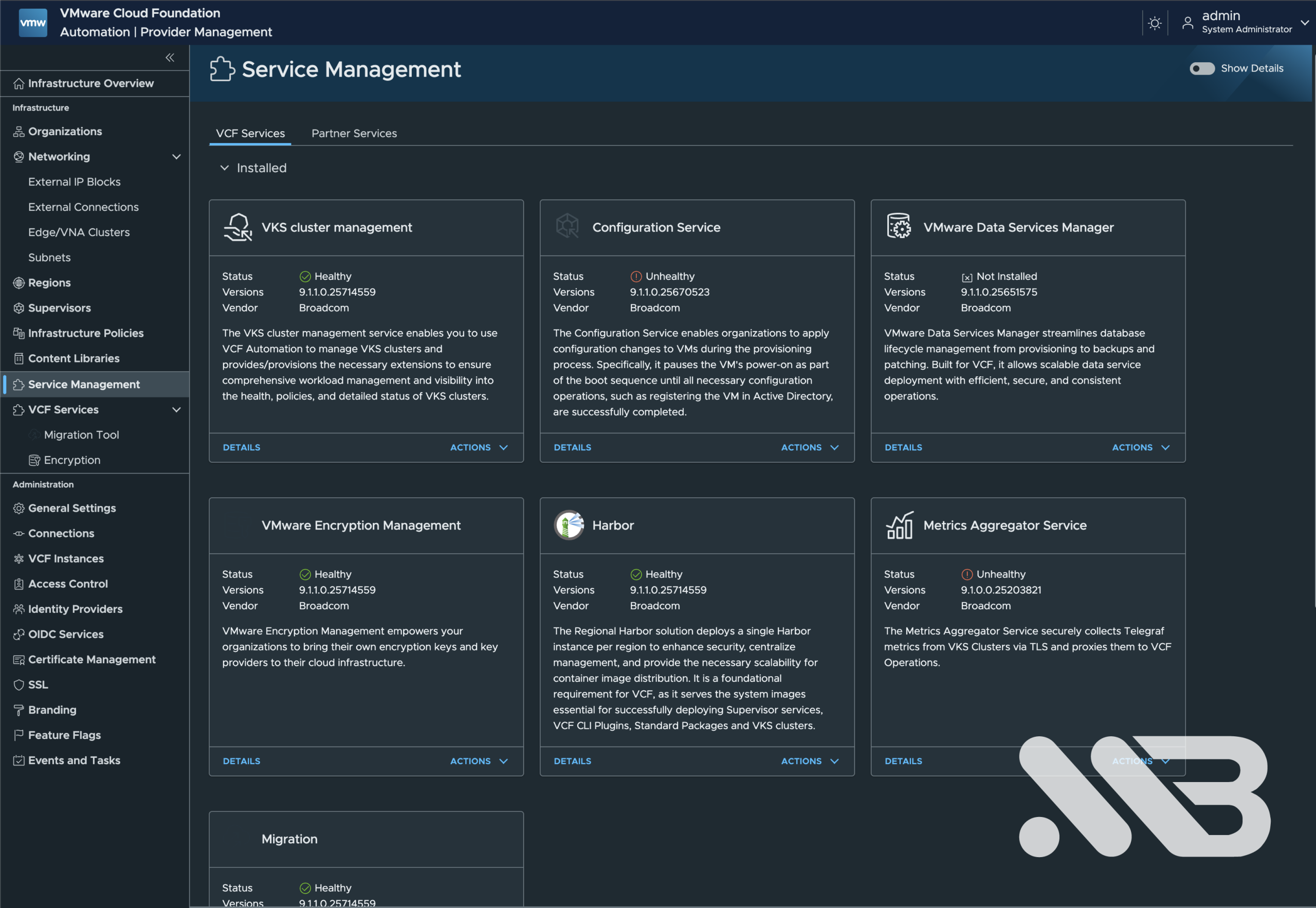
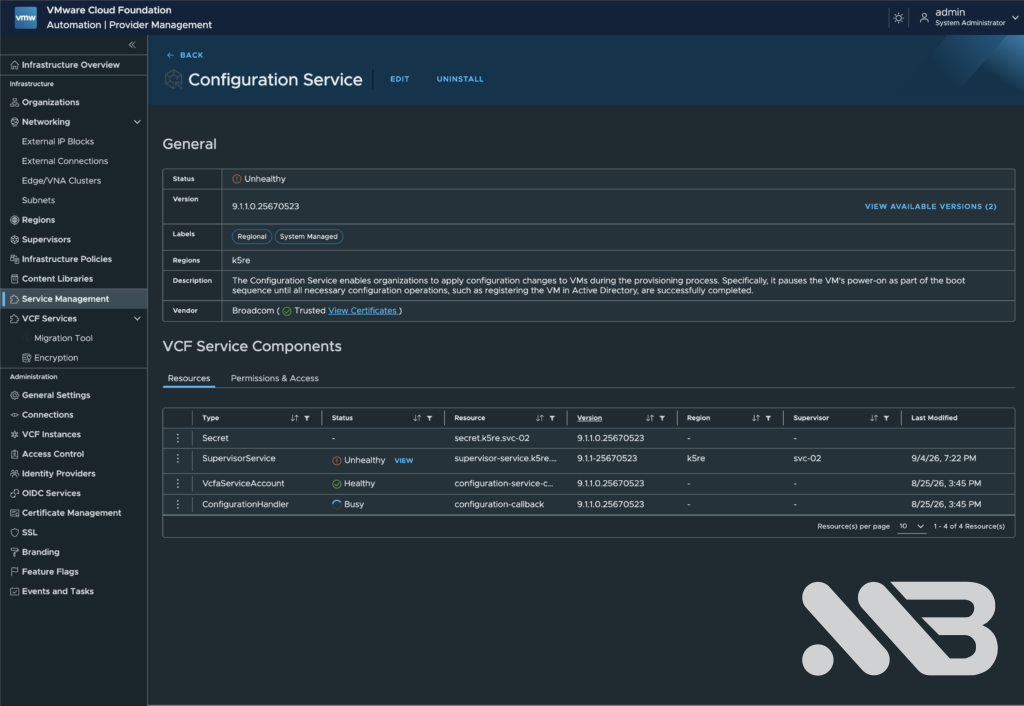
My management components were on 9.1.1, but the Supervisor was still on 9.0.2.x because VKS 3.4.1 blocked the next upgrade. I tried an intermediate Supervisor build, 9.0.2.0100-25262241, hoping it would break that deadlock. It installed cleanly. It did nothing for VKS. What it did do was leave two Supervisor Services in VCF Automation showing Unhealthy: Configuration Service and Metrics Aggregator Service. Not all six. Exactly two.

TL;DR
| Point | What I learned |
|---|---|
| The update wasn’t the cause | It triggered new reconciles that exposed a fault already present after the VCF Automation upgrade. |
500 and 404 were different clues | The original 500 meant delivery failed downstream; my test digest returned 404 NoSuchKey because that S3 key did not exist. |
Unhealthy was not an outage | Both services kept running. It was the periodic bundle fetch that failed. |
| Names misled me | The Supervisor image proxy was an nginx process inside kubectl-plugin-vsphere. |
| The registry wasn’t the right store | VCF Automation served these service bundles from an S3 bucket, not the reachable OCI registry beside it. |
| Root cause in this lab | The filer could not resolve volume 36, although the master and volume server still showed it. A stale filer cache best fit the evidence. |
| Fix | Restart the SeaweedFS filer and trigger fresh app reconciles; both services returned to Healthy. |
The symptom
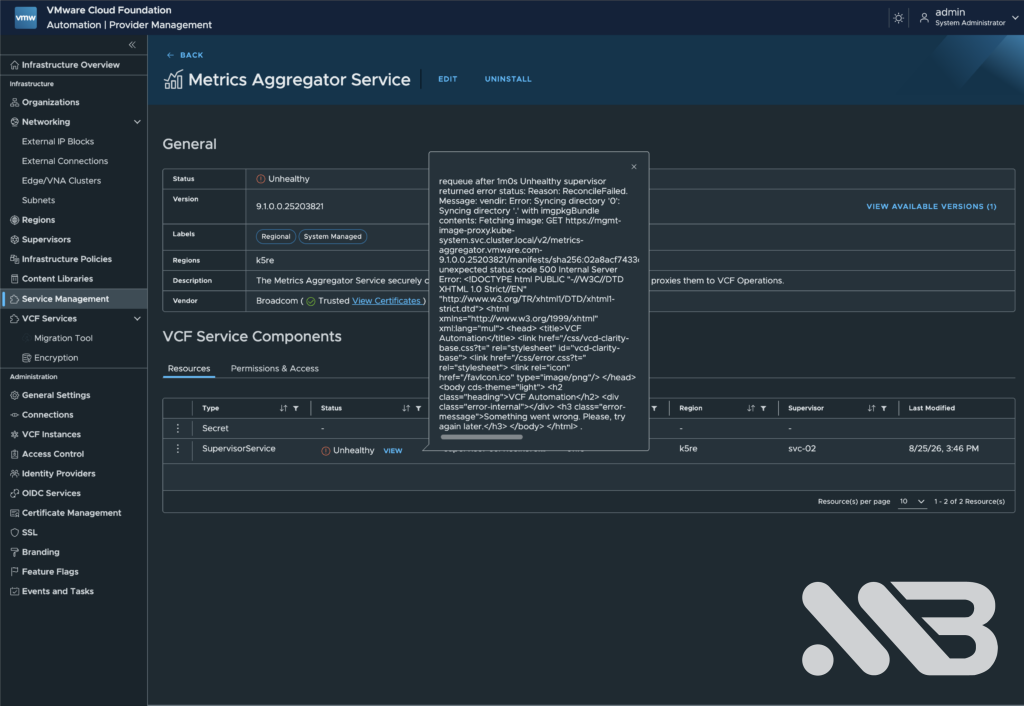
The error was the same for both services; only the repository name differed. Here is the relevant part from Configuration Service:
vendir: Error: Syncing directory '0': Syncing directory '.' with imgpkgBundle contents:
Fetching image: GET https://mgmt-image-proxy.kube-system.svc.cluster.local/v2/
  configuration.vsphere.vmware.com-9.1.1.0.25670523/manifests/sha256:b641af00…
unexpected status code 500 Internal Server Error: <HTML error page from VCF Automation>
The pods behind both services were still running. It was the periodic kapp-controller reconcile that failed because it could not fetch the bundle again. That was a different situation from an immediate service outage, although I would not want to rely indefinitely on running pods if a fresh pull might fail after a restart.
My first explanation was that VCF Automation 9.1.1 no longer served an older bundle. It sounded plausible: the services became red after an update. But Configuration Service was already on 9.1.1.0.25670523, the same generation as the platform. The truncated popup had hidden the useful part of the error. Reading .status.usefulErrorMessage in full ruled out my first theory.
Following the bundle request
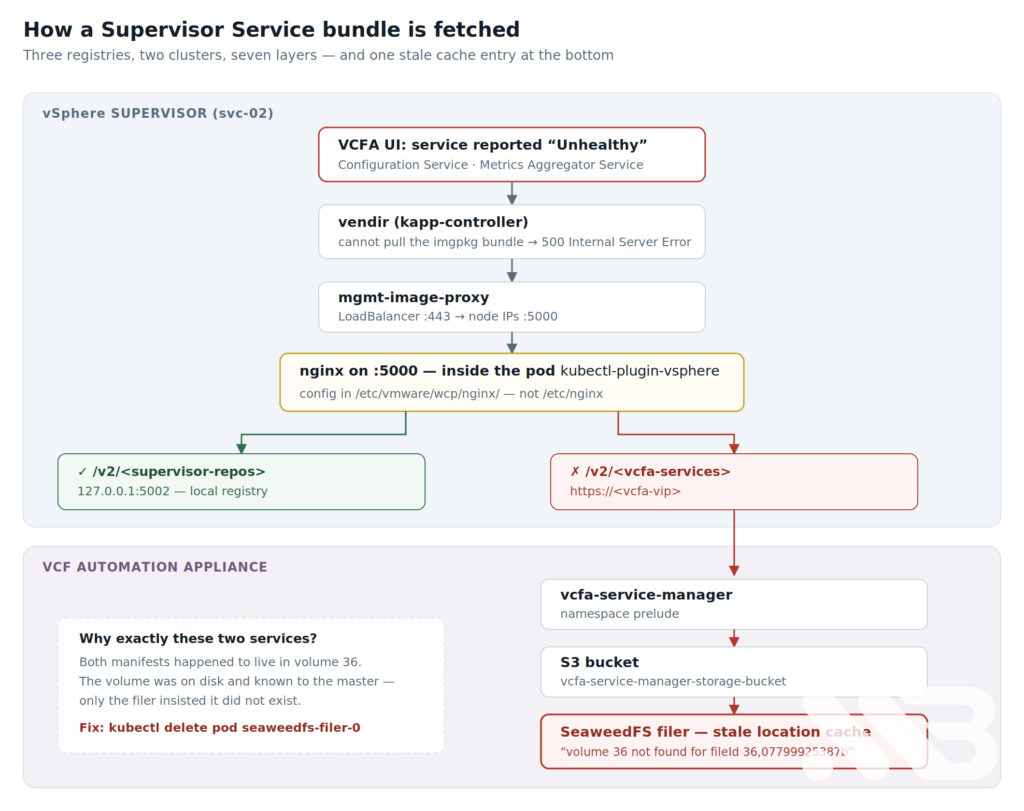
The endpoint in the error, mgmt-image-proxy.kube-system.svc.cluster.local, did not tell me where the failing request finally ended up. I traced it from the Supervisor:
vendirasked the Supervisor image proxy for the service bundle.mgmt-image-proxysent traffic to the control plane nodes on port 5000.- An nginx process on that port forwarded VCF Automation service repositories to the VCF Automation VIP.
vcfa-service-managerserved those bundles from its S3 bucket, backed by SeaweedFS.
The image proxy was the surprising part. I initially expected the service’s endpoints to be the docker-registry pods. They were the Supervisor control plane node IPs instead. On a node I checked which processes listened on the relevant ports:
ss -lntp | grep -E ':5000|:5002'
LISTEN 0 511 *:5000  users:(("nginx",pid=19110,…))
LISTEN 0 511 *:5002  users:(("registry",pid=…))
Then I looked up the nginx process:
crictl ps -a | grep 19110
It belonged to kubectl-plugin-vsphere. That pod also serves the vSphere kubectl plugin download, which is hardly the name I would have searched for while debugging an image proxy. Because the image has no shell to use with kubectl exec, I read the nginx configuration through the process root on the node:
grep -rhE 'proxy_pass|mgmt_image_registry' /proc/19110/root/etc/vmware/wcp/nginx/
set $mgmt_image_registry_upstream https://<vcfa-vip>;
proxy_pass $mgmt_image_registry_upstream;
...
proxy_pass http://127.0.0.1:5002;
There were two routes. Supervisor-owned repositories came from the local registry on port 5002; VCF Automation service repositories went to the appliance. The failing request followed the latter route. My next checks needed to be on VCF Automation.
The wrong registry, and the useful error it produced
The VCF Automation appliance also has an OCI registry in vmsp-platform. I checked it and found a seemingly neat explanation. It had the Configuration Service version by tag, but my request by digest returned a 404. Perhaps the digest in the Supervisor’s Package and App had gone stale during the upgrade?
I tested that theory with a server-side dry run and then patched the digest to the value I saw in that registry. The request still failed, but the response changed to an S3 XML error:
<Error><Code>NoSuchKey</Code><Resource>/vcfa-service-manager-storage-bucket/v2/…</Resource></Error>
That was a useful failed experiment. I had compared two different stores. The OCI registry in vmsp-platform was real and reachable, but vcfa-service-manager served these bundles from an S3 bucket. The digest I patched in did not refer to an object in that bucket. I rolled the patch back; the original digest had been correct.
| Response I saw | What it indicated in this investigation |
|---|---|
404 NoSuchKey with the test digest | That key was absent from the S3 bucket. |
The original 500 with an HTML error page | The request reached VCF Automation, but delivery failed further downstream. |
The difference matters. I had spent time treating a missing object in one store as evidence about an object served from another. The original 500 pointed me towards the S3 delivery path instead.
Volume 36 was there
The SeaweedFS filer logs on the VCF Automation appliance finally showed a more specific error:
GetObjectHandler: failed to stream
  vcfa-service-manager-storage-bucket/v2/…/manifests/sha256:02a8acf7…
  from volume servers: operation LookupFileId 36,07799925387b failed,
  err: volume 36 not found for fileId 36,07799925387b
I found 36 occurrences, all referring to volume 36. Both affected manifests were on that volume: 36,07799925387b for Metrics Aggregator and 36,03be607a90a00f for Configuration Service. That explained why two otherwise unrelated services failed together.
But the volume was present. Its .dat file was on seaweedfs-volume-0, the master topology listed volume 36, and the collection’s writable volumes included it. The filer alone reported that it could not find it. Given the timing of the previous VCF Automation upgrade and the recovery after restarting the filer, a stale volume-location cache was the most consistent explanation I found. I did not inspect that cache entry directly.
The intermediate Supervisor update caused the services to fetch their bundles again. It exposed the problem; the evidence did not show that it had removed the volume.
The fix
On the VCF Automation appliance I restarted the SeaweedFS filer pod:
kubectl delete pod -n vmsp-platform seaweedfs-filer-0
In this environment the filer state lived on a persistent volume. After the pod returned, the recent logs no longer showed volume 36 not found:
kubectl logs -n vmsp-platform seaweedfs-filer-0 --since=60s \
  | grep -c 'volume 36 not found'
# 0
The two Supervisor apps were on a ten-minute sync interval. To get an immediate reconcile, I temporarily changed their spec.syncPeriod; an annotation alone had not triggered the reconcile I needed:
for a in svc-metrics-aggregator.vmware.com svc-configuration.vsphere.vmware.com; do
  kubectl patch app -n vmware-system-supervisor-services "$a" \
    --type=merge -p '{"spec":{"syncPeriod":"1m0s"}}'
done
About 45 seconds later both reported Reconcile succeeded. I then restored syncPeriod to 10m0s and verified the setting. Two services were healthy again. The Supervisor, however, was still on 9.0.2.x and VKS 3.4.1 was still the next blocker.
The checks I would run next time
| Question | Check |
|---|---|
| Which bundle does the failing app request? | Read the App’s bundle image. |
| What is the complete error? | Read the App’s full reconcile message. |
| Who listens on the Supervisor control plane? | Check ports 5000 and 5002 on a control plane node. |
| Where does the proxy forward? | Read nginx’s proxy configuration on that node. |
| Do the SeaweedFS logs show storage errors? | Check the filer logs on VCF Automation. |
| Does the master know the volume? | Query the SeaweedFS master topology. |
| Is the volume file on disk? | Look for the volume file on the volume server. |
Here are the commands behind those checks. Replace values in angle brackets with the ones from your environment.
On the Supervisor:
kubectl get app -n vmware-system-supervisor-services <name> \
  -o jsonpath='{.spec.fetch[0].imgpkgBundle.image}'

kubectl get app -n vmware-system-supervisor-services <name> \
  -o jsonpath='{.status.usefulErrorMessage}'
On a Supervisor control plane node:
ss -lntp | grep -E ':5000|:5002'

grep -rhE 'proxy_pass|mgmt_image_registry' \
  /proc/<nginx-pid>/root/etc/vmware/wcp/nginx/
On VCF Automation:
kubectl logs -n vmsp-platform seaweedfs-filer-0 \
  | grep -iE 'error|NoSuchKey'

curl -s http://<master-pod-ip>:9333/dir/status

kubectl exec -n vmsp-platform seaweedfs-volume-<n> \
  -- sh -c 'ls -la /data1/ | grep _<id>\.'
Two access notes that cost me time: on the Supervisor I needed its management IP, not the workload IP. On the VCF Automation appliance, I logged in as vmware-system-user and used sudo su -; plain su - failed authentication.
What I learned
The VCF Automation registry I could reach was not the service bundle store I needed to debug. My test patch was wrong, but it was reversible and the NoSuchKey response showed me the request had reached an S3 path. I rolled the patch back as soon as that was clear.
The intermediate Supervisor update did not make the SeaweedFS volume disappear. It caused the services to request their bundles again and exposed a lookup problem in the storage path. The filer logs, master topology and volume file told a more useful story than the Unhealthy label alone. Restarting the filer resolved the error in this run; I did not inspect the cache entry directly, so the stale-cache explanation remains an inference from those observations.
Both services ended up healthy. The original VKS blocker did not: my Supervisor was still on 9.0.2.x with VKS 3.4.1. That is where Part 3 picks up. There I register VKS 3.6.2, upgrade the Supervisor, and deal with two more surprises on the way to a healthy Harbor service.
If you have traced the same bundle fetch path through VCF Automation, I would be interested to hear whether your failure also ended at the filer or somewhere else along the chain.

No responses yet